Skip to content

Trust starts
with evidence.

Control access, protect sensitive data and decide where model requests can go. Keep a record your team can inspect and verify.

Follow the request.
See the controls.

Access starts with Microsoft, Google or Apple sign-in, authenticator-app 2FA, roles and workload credentials. From there, your policy travels with each model request.

Inside your workspace

Welcome Alex Morgan

Personal values protected
Protected request

Welcome PERSON_1

EU-hosted · EU-ownedResidency checked before routing
Recorded with the request8f21… → b40a… → d93c…

Example request · your policy determines the action.

Protect the details.

Choose detection profiles for personal data and secrets. Replace detected values with reversible tokens before the request reaches the model.

Your policy can tokenize, mask, block or log detections. On protected scans, handwriting and ink the OCR cannot read are destroyed, not guessed. No detection profile guarantees complete coverage.

Explore data protection

Choose the destination.

EU-only by default. Hosting region, provider ownership and your allow-list determine which model routes are eligible.

An EU hosting region and EU provider ownership are separate controls.

Explore residency and DPA

Keep the evidence.

Each request is recorded once, with the checks that ran on it grouped underneath: name recognition, data protection, scope guard and security scan. Routing and outcome join a hash-chained audit trail you can export and verify independently.

With content retention on, the request trace shows each tool call’s input and output together.

Try verifying a record

A record you can
put to the test.

Each record is linked to the one before it. Changing a sealed record breaks the chain’s verification.

Try it with this sample: change the scope guard verdict, then restore it to see the difference.

Sample audit chainSHA-256
  1. request #117…
  2. ↳ name recognition…
  3. ↳ data protection…
  4. ↳ scope guard…
  5. ↳ security scan…
Preparing sample chain…

This local example recalculates the hashes. No customer records are used.

One request.
Every check beneath it.

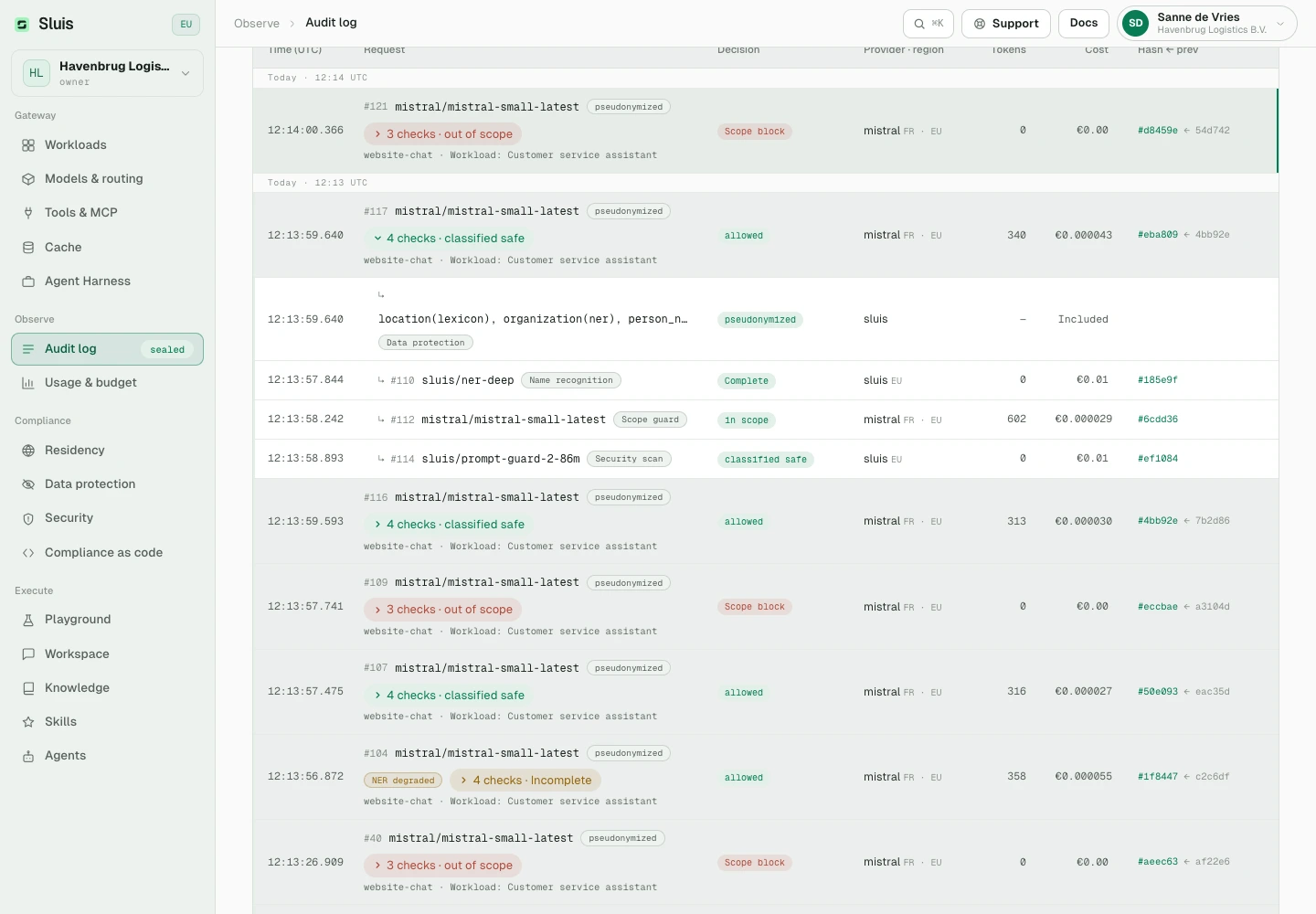
The audit log lists each request once, with the checks that ran on it grouped underneath. Expand a row to see each layer’s verdict and cost.

Sluis console audit log. Request #117 is expanded and shows four checks: data protection, name recognition, scope guard and security scan.
Screenshot of the Sluis console with a sample organisation. Requests the scope guard refused are marked out of scope.

AI for teams with real responsibilities.

Talk about your team
Ministerie van Justitie
Omgevingsdienst de Vallei
DCMR Milieudienst Rijnmond
Omgevingsdienst Groene Metropool
Omgevingsdienst Regio Utrecht (ODRU)
Omgevingsdienst Midden-West-Brabant
COA
RDW
Adjust
Universiteit van Amsterdam
NHA
Moco Museum
Chemgas
InShared
Het Oranje Kruis
Storteboom
Hyva
Arbeid.ai
Kleentec
Rho Adviseurs
Bezwaarschriftenadviescommissie (BAC)
SoundAware
DLV Advies
Star-shl
Stratego
Contakt
NeKo Ship Supply
Hulshoff
Logisnext / Mitsubishi Forklift Trucks
Bloem Infra
Loendersloot Group
Procap
Condor
Hoogheemraadschap van Rijnland
Aegir Marine
VO-raad & PO-raad
Weekamp Deuren
DBF
STL
Voetbal International
Sena
Move Beyond
Farmplus
Woonbedrijf
Boekenbalie
Medicinfo
Kwast Wijnkopers
Royal ZON
Verhoeven
ABN AMRO
BASF
Bayer
Eurocross
Gilead Sciences
Edelman
PXR
Avanti
Wim Hof Method
Nictiz
Nétive VMS

Erase the content.
Keep the proof.

Configure how long request and response content is retained. Content can be purged while audit metadata and hash links remain available for verification.

Retained content and caches are encrypted at rest. Turn content retention off for a metadata-only ledger; response caches are then disabled too.

Explore retention controls
Request record
Retained content

Prepare a welcome email for Alex Morgan.

Audit metadata
Retained
Routing decision
EU · policy applied
Chain links
Verifiable

Ready for
your review.

Start with the documentation. Bring your questions, procurement requirements and security questionnaire to our team.

Reporting a vulnerability?

Send security reports privately to hello@sluis.ai.

Report an issue

A few useful answers.

Does EU hosting mean a provider is EU-owned?

No. Hosting region and legal ownership are separate controls. The EU-owned-only setting excludes EU-region deployments of providers owned outside the EU.

Does data protection find every sensitive value?

No detection profile guarantees complete coverage. Choose the layers for your data and review benchmarks and outcomes. Optional hosted inspection processes remaining eligible text with a provider and adds latency and cost.


How are coding-agent requests different?

The coding agent and working files stay on the developer’s machine. Sluis governs its model traffic and exposed MCP tools. The provider chooses the serving region for subscription-backed agent requests, which is recorded as unverified.

Can the data plane run on our own infrastructure?

Yes. Sluis Edge runs the data plane, retained content, credentials and audit ledger in your environment. Use local models when model traffic must stay inside your network.

Is everything the model reads pseudonymized?

No. Pseudonymization works one way: it protects what your organisation sends out. In Sluis Workspace, public web search results reach the model unaltered. A value your conversation already tokenized stays tokenized inside those results, so a result cannot reveal what a token stands for.



Bring your requirements.

We’ll work through the data flow, controls and evidence with you.

Talk security